Best Laser Engraver Accessories
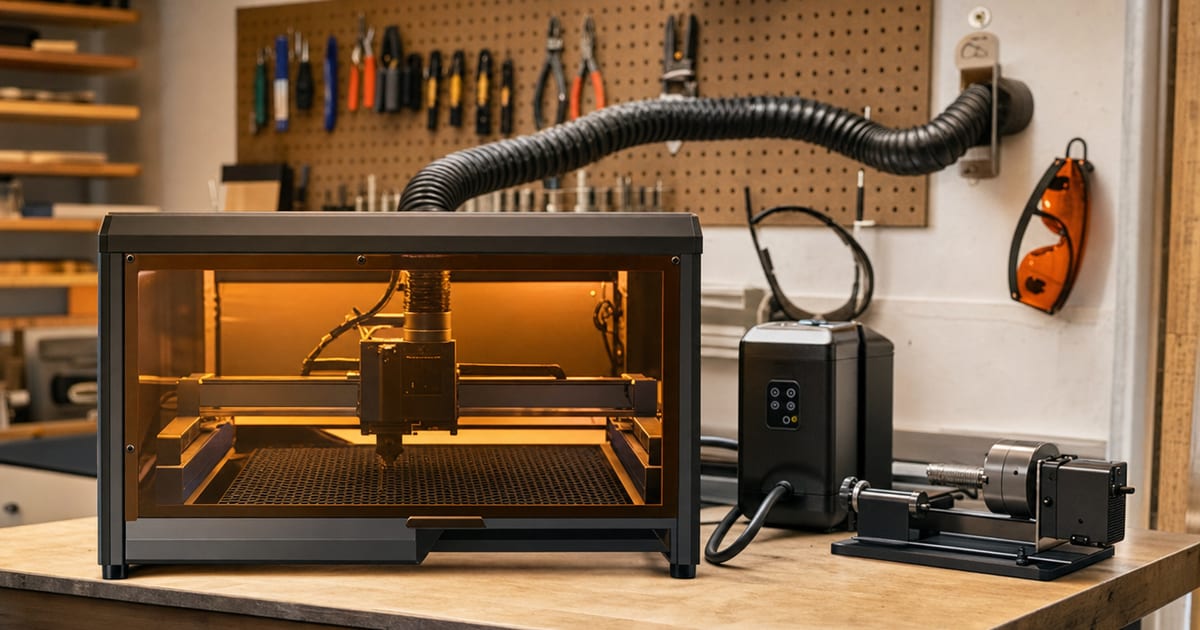
The machine is only the start. This guide compares the accessory cart-stack that makes a laser usable and safe — correctly-rated laser glasses, fume extraction, air assist, enclosures, honeycomb beds, rotary attachments and software — and sorts what is safety-critical from what is nice-to-have, so you buy in the right order. It walks the buying criteria for each, then matches them to five categories: safety-critical first buy, best fume extraction, best air assist, best enclosure & bed and best software & extras. Verified picks appear in each slot once real product data is in.
A note on how to read this. There is no single "best" accessory set for everyone — what you need depends on your machine type, your space, and the materials you cut. So the value here is the order of operations: what is genuinely safety-critical and must come first, versus what improves results or convenience and can wait. Read that order, then look at the picks. This page exists because of the second half of my own first-laser mistake: I didn't just buy the wrong machine, I ran it on a kitchen table with no air assist and no real ventilation, choked the room with acrylic fumes, and scorched the first sheet. Bad ventilation ruins more first projects — and more lungs — than bad optics do, which is why this guide puts glasses, extraction and air assist ahead of every nice-to-have.
Specs verified against manufacturer details and current Amazon listings — no hands-on testing claims. Laser safety: wear correctly wavelength/OD-rated laser glasses, run proper fume extraction/ventilation, and never leave a running laser unattended — follow the manufacturer's instructions.
How to choose your laser accessories — in order
Accessories split cleanly into two groups: the safety-critical kit you buy before you run the machine seriously, and the result-and-convenience kit you add as your work grows. Buy in that order. The sections below cover the criteria for each, and they match the columns in the comparison.
Correctly-rated laser glasses — safety-critical, buy first
Laser glasses protect your eyes from the specific light your machine emits, and the only thing that matters is the rating — not the price or the tint. The two figures to match are the wavelength range (a diode is around 450nm, a CO2 around 10.6µm) and the optical density (OD), which describes how much of that light the lens blocks. Ordinary tinted goggles do not protect your eyes from laser light, no matter how dark they look. Buy glasses that explicitly state a wavelength range and OD that cover your machine, and follow the manufacturer's guidance. This is the one accessory you never compromise or delay.
Fume extraction — safety-critical, buy first
A fume extractor pulls smoke and fine particles away from the cut and either ducts them outside or filters them through carbon and HEPA stages. Laser smoke from acrylic, leather and MDF is harmful to breathe, so extraction is safety-critical, not optional. The figure to match is airflow (commonly quoted in CFM or m³/h) against your enclosure volume — too little airflow leaves smoke in the cabinet and in the room. Ducting outside is the simplest clean option; a filtered extractor suits makers who can't vent through a wall, provided the filters are maintained. Never cut materials that release toxic gas, such as PVC or vinyl, whatever extraction you run.
Air assist — essential for clean, safe cutting
Air assist blows a stream of air across the cut point, clearing smoke and suppressing flame. The payoff is cleaner edges, far less scorching and fewer flare-ups — and on cutting jobs it is a safety contributor as much as a quality one. The figures that matter are airflow and pressure and whether it is an active pump or a passive feed; an active air-assist pump gives stronger, steadier flow for cutting. Treat air assist as essential rather than a bonus for any maker who cuts, and pair it with the extraction above — the two solve different halves of the same smoke problem.
Enclosures, honeycomb beds and rotary — results and capability
Past the safety kit, these add safety margin, cut quality and capability. An enclosure contains the beam and stray light on an open-frame diode and channels smoke to a single exhaust port — close to safety-critical for an open-frame machine, and the figure to match is its internal size against your machine. A honeycomb bed supports the workpiece, lets smoke and air pass underneath, and reduces back-reflection and flashback marks for cleaner cuts. A rotary attachment rotates cylindrical objects — tumblers, glasses, bottles — so you can engrave around them; match its capacity and chuck type to the objects you work and confirm it fits your machine.
Software (LightBurn) and the extras — convenience and control
Software ties the workflow together. LightBurn is the maker-standard control software and supports most diode and CO2 lasers with far better layout, control and material-setting tools than typical bundled software. The criterion is compatibility: confirm your machine is LightBurn-supported before relying on it, as some machines need a bridge or specific firmware. A LightBurn camera, riser feet for taller objects and spare consumables round out the extras — genuine quality-of-life upgrades, but ones that come after the glasses, extraction and air assist are sorted.
| Best for | Category | Fits | Key spec | Safety-critical |
|---|---|---|---|---|
| Best enclosure | Protective enclosure | Most open-frame diode engravers | Fireproof, dustproof, foldable, exhaust port | Yes (fume containment & fire risk) |
| Best fume extractor | Fume extractor / air filtration | 10-40W laser engravers | 3-stage filtration (incl. HEPA + carbon) | Yes (removes hazardous fumes) |
| Best air assist | Air assist pump kit | Most diode laser engravers | Adjustable up to 30 L/min, low noise | Partial (reduces flare-ups, protects lens) |
| Best laser safety glasses | Laser safety glasses | Blue diode laser users (455nm range) | OD6+ optical density protection | Yes (eye protection — essential) |
| Best honeycomb bed / rotary | Honeycomb working bed | Engravers up to 400 x 400 mm | Aluminum honeycomb, protects work surface | Partial (protects table, improves cut airflow) |
Our top picks
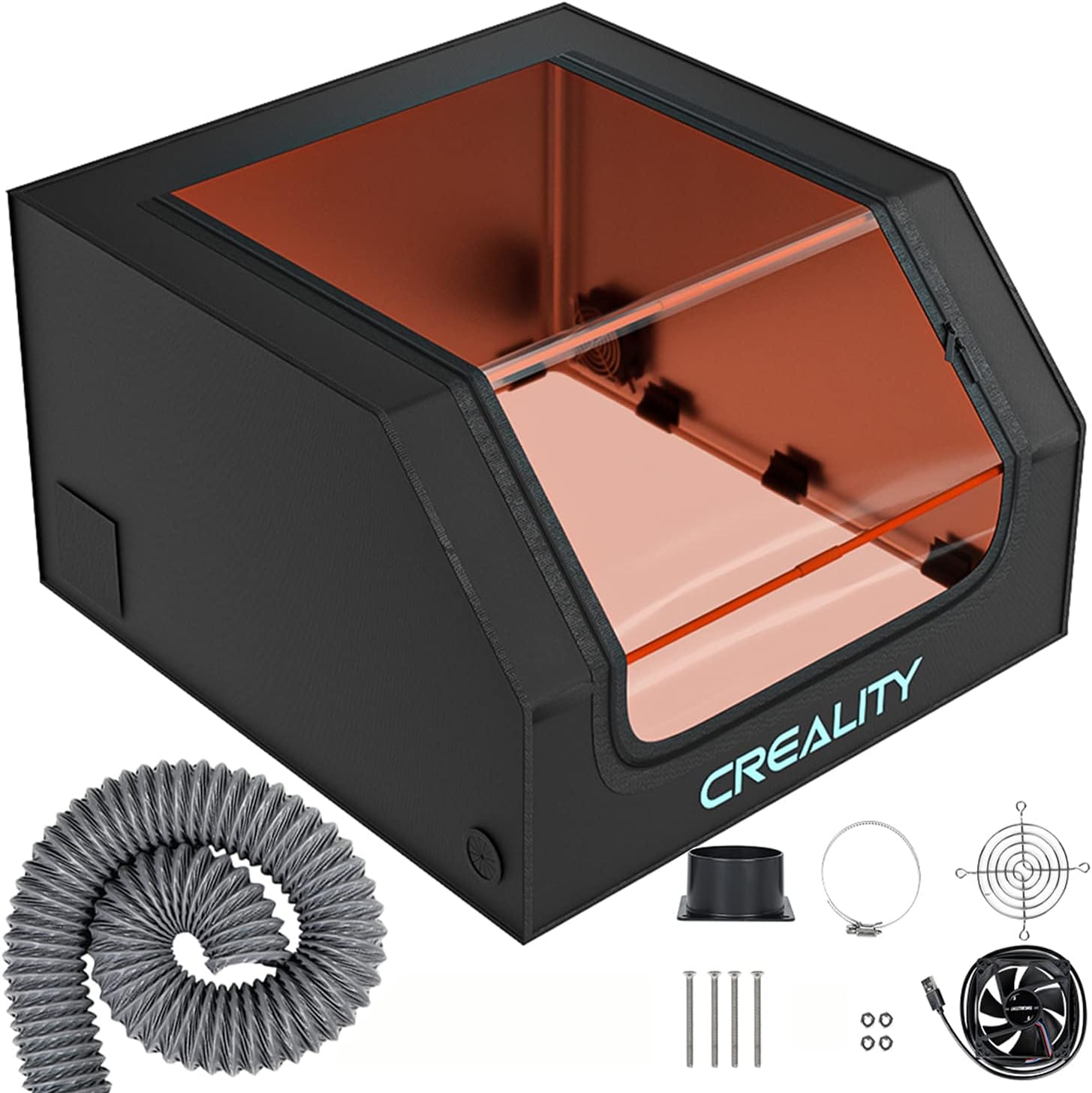
Best enclosure: Creality Laser Engraver Enclosure, Fireproof and Dustproof Foldable Protective Cover with Exhaust Fan
Best enclosure
Creality Laser Engraver Enclosure, Fireproof and Dustproof Foldable Protective Cover with Exhaust Fan
Creality
- Category: Protective enclosure
- Fits: Most open-frame diode engravers
- Key spec: Fireproof, dustproof, foldable, exhaust port
- Safety-critical: Yes (fume containment & fire risk)
The Creality enclosure is a foldable fireproof, dustproof cover with an exhaust port to contain smoke and stray light from open-frame engravers. It is the best enclosure pick for safely running a diode laser indoors.
Last checked 2026-06-15
Best fume extractor: FUMEGO Laser Fume Extractor Compatible with 10 to 40W Laser Engravers, 3-Stage Filtration

Best fume extractor
FUMEGO Laser Fume Extractor Compatible with 10 to 40W Laser Engravers, 3-Stage Filtration
FUMEGO
- Category: Fume extractor / air filtration
- Fits: 10-40W laser engravers
- Key spec: 3-stage filtration (incl. HEPA + carbon)
- Safety-critical: Yes (removes hazardous fumes)
The FUMEGO is a dedicated laser fume extractor with three-stage filtration to pull and clean smoke and VOCs at the source. It is the best fume-extractor pick for makers without an outside-venting window.
Last checked 2026-06-15
Best air assist: AlgoLaser Air Assist for Laser Engraver, Air Assist Pump Kit with Adjustable 30L/Min Airflow

Best air assist
AlgoLaser Air Assist for Laser Engraver, Air Assist Pump Kit with Adjustable 30L/Min Airflow
AlgoLaser
- Category: Air assist pump kit
- Fits: Most diode laser engravers
- Key spec: Adjustable up to 30 L/min, low noise
- Safety-critical: Partial (reduces flare-ups, protects lens)
The AlgoLaser air assist blows debris and smoke away from the cut line, improving cut quality and reducing fire risk and lens fouling. It is the best air-assist pick for cleaner cuts on wood and acrylic.
Last checked 2026-06-15
Best laser safety glasses: BLUETIMES Laser Safety Glasses, OD6+ Eye Protection Goggles for Diode Laser Engravers

Best laser safety glasses
BLUETIMES Laser Safety Glasses, OD6+ Eye Protection Goggles for Diode Laser Engravers
BLUETIMES
- Category: Laser safety glasses
- Fits: Blue diode laser users (455nm range)
- Key spec: OD6+ optical density protection
- Safety-critical: Yes (eye protection — essential)
These OD6+ safety glasses block the blue diode wavelength to protect the operator's eyes from direct and scattered laser light. They are the single most safety-critical accessory for anyone running a diode laser.
Last checked 2026-06-15
Best honeycomb bed / rotary: Tyvok Honeycomb Black Laser Bed 400x400mm Working Table for Laser Engravers

Best honeycomb bed / rotary
Tyvok Honeycomb Black Laser Bed 400x400mm Working Table for Laser Engravers
Tyvok
- Category: Honeycomb working bed
- Fits: Engravers up to 400 x 400 mm
- Key spec: Aluminum honeycomb, protects work surface
- Safety-critical: Partial (protects table, improves cut airflow)
The Tyvok honeycomb bed supports the workpiece while letting cut-through laser energy and airflow pass, protecting the bench and improving edge quality. It is the best work-surface upgrade for cutting on a diode laser.
Last checked 2026-06-15
How to spread the accessory budget
A common question from new makers is how much of the budget should go to accessories versus the machine. The honest answer is that the safety-critical layer is small relative to the laser but non-negotiable, so it should be the first money spent after the machine itself — glasses, fume extraction and air assist together cost a fraction of the cutter but decide whether you can run it safely at all.
After that, the result-and-capability kit — enclosure, honeycomb bed, rotary, software — is where you can pace spending against the work you actually take on. A maker who only engraves flat wood doesn't need a rotary; one who works tumblers does. Buy each piece when the work demands it rather than all at once, and let the materials you cut, not a checklist, set the order. The one rule that never bends is that the safety layer comes before any of it.
Who should buy what
The maker setting up a new laser — safety-critical first buy
If you have just bought the machine and nothing else, the safety-critical first buy slot is where to start, and it is non-negotiable: correctly wavelength/OD-rated laser glasses, fume extraction ducted outside or properly filtered, and air assist for clean cutting. Spec-by-spec, these three solve the eye-protection, breathing and edge-quality problems that decide whether your first runs go well or end in fumes and scorched stock. Everything else can wait; this kit cannot. Buy it before the first serious job, not after.
The maker venting a home workshop — best fume extraction
The best fume extraction slot suits the maker whose biggest setup problem is getting smoke out of the room. The figure that matters is airflow against enclosure volume: match the CFM or m³/h rating to the cabinet you need to clear, and prefer ducting outside where the space allows. The trade-off is that a filtered extractor frees you from a wall vent but adds filter upkeep, while a vented fan is simpler but needs an outlet. Either way this is safety kit, not convenience — size it properly rather than buying the cheapest unit.
The maker chasing cleaner cuts — best air assist and bed
For the maker whose cuts come out scorched or marked, the best air assist and best enclosure & bed slots are the fix. Spec-by-spec, an active air-assist pump clears smoke and suppresses flame for cleaner edges, a honeycomb bed lets air and smoke pass under the work and cuts back flashback marks, and an enclosure on an open-frame diode contains the beam and channels smoke. The trade-off is cost and bench space against quality and safety margin — usually worth it once you are selling what you make.
The maker who wants more control and capability — software & extras
The best software & extras slot is for the maker ready to push past the bundled software and basic kit. The criterion for software is compatibility — confirm your machine is LightBurn-supported — and the payoff is far better layout, control and material settings. A rotary attachment adds cylindrical work like tumblers and glasses, and a camera speeds up placement. The trade-off is that these are quality-of-life upgrades, not safety kit, so they come after the glasses, extraction and air assist are already in place.
Where this fits in the setup
Accessories are the last layer over the machine. Settle the right laser for your material first, then sort this kit. Still choosing between a diode and a CO2? The diode-vs-CO2 chooser and the material-cut calculator point you to the machine that matches your work.
Common accessory mistakes to avoid
The first mistake is buying the order wrong — splurging on a rotary or a camera before the glasses, extraction and air assist are sorted. The safety-critical kit comes first, every time; the convenience kit comes after. A maker with a great rotary and no fume extraction has spent money in the wrong order.
The second is treating glasses as a tint choice. Ordinary tinted goggles do not protect your eyes from laser light — only glasses rated for your machine's wavelength and optical density (OD) do. Match the rating to your laser (around 450nm for a diode, around 10.6µm for a CO2), not the price or the colour, and never run the machine without them.
The third is undersizing extraction or skipping air assist. A fume extractor rated below your enclosure volume leaves smoke in the room, and cutting without air assist scorches edges and risks flare-ups. Match airflow to the cabinet, run an active air-assist feed for cutting, duct outside where you can, and never cut PVC or vinyl whatever extraction you run. Buy the safety layer properly and in order, and the rest of the cart-stack is just upside.
Frequently asked questions
What laser accessories should a maker buy first?
Buy the safety-critical kit first: correctly-rated laser glasses, proper fume extraction or an exhaust fan ducted outside, and air assist for clean cutting. After that, an enclosure (for open-frame diodes), a honeycomb bed for clean cuts, and a rotary for cylindrical objects. Software like LightBurn ties it together. Verified picks land here once real data is in.
What does a laser fume extractor do?
It pulls smoke and fine particles away from the cut and either ducts them outside or filters them through carbon and HEPA stages. Laser smoke from acrylic, leather and MDF is harmful to breathe, so a fume extractor or a vented exhaust fan is safety-critical, not optional — match the airflow rating to your enclosure volume.
Are cheap laser safety glasses safe?
Only if they are rated for your machine’s specific wavelength and optical density (OD). Price is not the issue — the rating is. Ordinary tinted goggles do not protect your eyes from laser light. Buy glasses that state the wavelength range and OD that match your laser, and follow the manufacturer’s guidance.
Is LightBurn worth buying?
For most makers, yes — LightBurn is the maker-standard control software and supports most diode and CO2 lasers with far better layout, control and material-setting tools than typical bundled software. Confirm your machine is LightBurn-compatible before relying on it; some machines need a bridge or specific firmware.