Best Laser Engravers for Wood
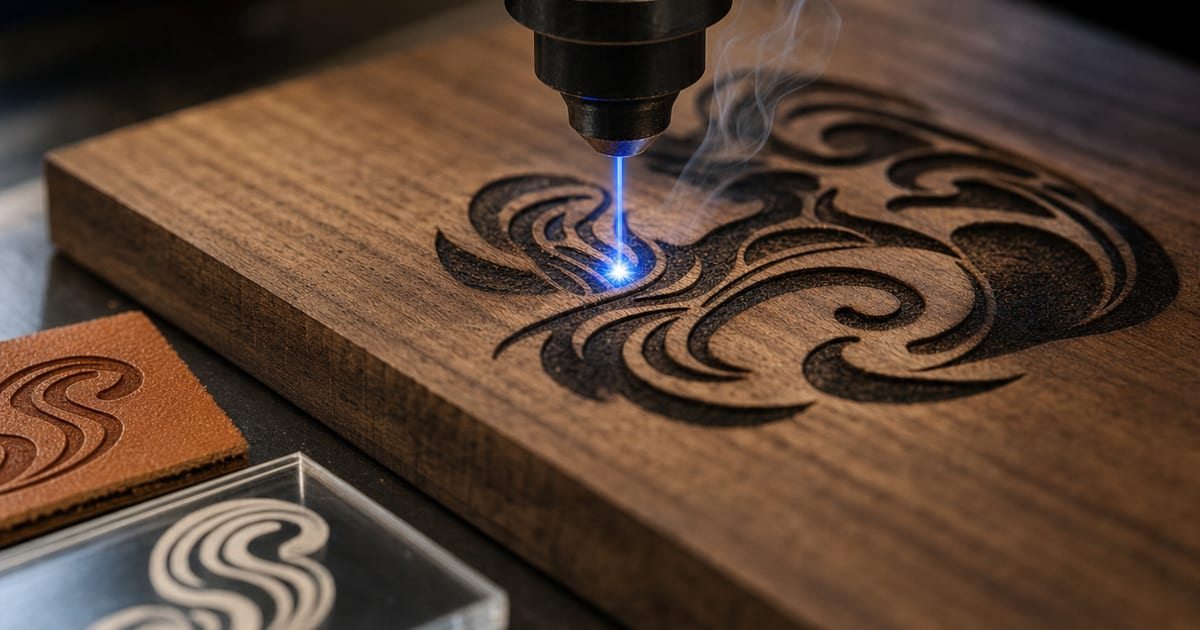
Wood is the material most makers buy a laser for — signs, ornaments, plaques and craft cuts. The best laser for wood is the one with enough optical wattage for how thick you cut, on a bed big enough for your work, of the type that matches how you work. This guide explains the specs that decide the fit for wood — optical wattage versus thickness, diode versus CO2, work area, and air assist for clean low-char edges — then matches them to five maker categories: best overall, best budget wood engraver, best for engraving, best for cutting thick wood and best large-format. Verified picks appear in each slot once real product data is in.
A note on how to read this. There is no single "best" laser for wood — the right one depends on whether you mostly engrave or also cut, how thick the wood is, how big your pieces are, and your budget. So the value here is the framework: what each spec changes for wood specifically, so you can shortlist a machine that fits your work. Read the framework first, then look at the picks. Wood is also the material that taught me how forgiving and how unforgiving lasers can be in the same week — in my own workshop a 20W diode engraves wood beautifully and cuts thin ply happily, but the day I tried to push it through thick hardwood I learned that cutting and engraving are two very different wattage problems. That is why this guide separates "what wattage engraves" from "what wattage cuts" instead of treating wood as one capability.
Specs verified against manufacturer details and current Amazon listings — no hands-on testing claims, just the figures and the trade-offs that decide the fit. Cut/engrave-capability figures are drawn from published specs and manufacturer cut charts, not bench tests.
How to choose a laser engraver for wood
A handful of specs decide whether a machine suits the wood work you do. These are exactly the columns in the comparison below, and the first question is always the same: are you engraving, cutting, or both?
Engraving versus cutting — two different wattage problems
The most useful thing to know about wood is that engraving and cutting ask for completely different power. Engraving only removes a shallow surface layer, so it needs very little optical wattage — even a 5W diode engraves wood crisply. Cutting has to burn all the way through, so it needs far more power and scales with thickness. Spec-by-spec, a machine that engraves any wood beautifully may barely cut 3mm ply, because the two jobs are not the same demand on the laser.
So decide your split before you shop. If you mostly engrave finished wood — signs, plaques, cutting boards — almost any diode in the range does it, and you are really choosing on bed size and speed. If you also cut shapes from sheet stock, the cutting thickness sets the wattage and pushes you toward the higher diode bands or a CO2. Getting this split right is what stops a maker from overbuying power they never use, or underbuying and being unable to cut.
Optical wattage versus wood thickness
For cutting, optical wattage maps to the thickness you can get through. Spec-by-spec, a 5W optical diode cuts only very thin wood and card; a 10W cuts thin plywood in passes; a 20W cuts plywood up to roughly 6mm in passes — the all-round maker band; and a 40W diode or a 40W+ CO2 pushes into thicker hardwood. CO2 brings an edge-quality advantage on thicker stock: it cuts faster and with cleaner, less-charred edges in fewer passes than a diode at the same nominal wattage.
Ignore the inflated "input watt" number on the box — only the optical wattage predicts cutting. The trap is buying more power than your thickest wood needs, which costs money, heat and ventilation you could have skipped, or buying too little and being stuck. Match the optical wattage to the thickest wood you cut regularly, and use the material-cut calculator to turn a wood and thickness into the wattage that does the job.
Diode or CO2 for wood — the value-versus-edge trade-off
Both diode and CO2 work on wood, and the choice is a trade-off, not a one-way upgrade. A diode is cheaper, simpler to vent, and excellent for engraving and cutting thinner stock — the value pick for most wood makers. A CO2 costs more and needs more setup, but cuts thick hardwood faster and with cleaner, lower-char edges, and it doubles as your route to acrylic and other materials a diode cannot cut.
Spec-by-spec, if your wood work is mostly engraving and cutting thin-to-medium stock, a 20W diode is the value sweet spot; if you cut thick hardwood often or want the cleanest edges, a CO2 earns its cost. The diode-vs-CO2 chooser walks the decision from your materials and thickness, and the CO2 cutter guide covers the upgrade path if thick cutting is your priority.
Work area and clean, low-char cuts
Work area sets the largest sign or board you can do in one pass — a 400×400mm frame covers most wood signage and batch craft, while a smaller bed forces tiling. Beyond size, clean wood results come down to air assist and focus: air assist blows smoke and flame off the cut for cleaner edges and far less scorching, correct focus keeps cuts sharp, and masking the surface reduces edge char on engraves. Treat air assist as essential for wood, run proper fume extraction ducted outside, and never leave the laser running unattended — wood cutting is a fire risk. The best laser engraver accessories guide covers the air-assist and extraction kit that make wood cuts clean and safe.
| Best for | Optical wattage | Type | Work area | Wood capability | Air assist |
|---|---|---|---|---|---|
| Best overall for wood | 40 W (marketed module power) | Diode (enclosed) | Large enclosed bed | Wood, plywood, acrylic, leather | Included |
| Best budget for wood | 7 W (7000mW module) | Diode | 200 x 150 mm | Wood, acrylic, leather | Not listed |
| Best diode for cutting wood | 48 W (marketed module power) | Diode (multi-beam) | Large-format | Thick wood, plywood, acrylic | Included |
| Best CO2 for wood | 60 W (DC glass tube) | CO2, enclosed | 16 × 24 in (400 × 600 mm) | Wood, glass, acrylic, leather and other non-metals (engraves to 0.4 in) | Built-in |
| Best compact for wood signs | 12 W (12000mW module) | Diode (cube form factor) | Compact | Wood, bamboo, slate, leather | Available |
Our top picks
Best overall for wood: TOOCAA 40W Enclosed Laser Engraver with Smart AI, Diode Laser Cutter for Wood

Best overall for wood
TOOCAA 40W Enclosed Laser Engraver with Smart AI, Diode Laser Cutter for Wood
TOOCAA
- Optical wattage: 40 W (marketed module power)
- Type: Diode (enclosed)
- Work area: Large enclosed bed
- Max speed: High-speed
- Materials: Wood, plywood, acrylic, leather
- Air assist: Included
The TOOCAA 40W is an enclosed, high-power diode machine that engraves and cuts wood cleanly with built-in safety and air assist. It is the best overall wood pick for makers who want power plus a contained, safer workflow.
Last checked 2026-10-09
Best budget for wood: Artilume U1 Laser Engraver & Cutter Machine with 200x150mm Area, LightBurn Compatible, 7000mW for Wood

Best budget for wood
Artilume U1 Laser Engraver & Cutter Machine with 200x150mm Area, LightBurn Compatible, 7000mW for Wood
Artilume
- Optical wattage: 7 W (7000mW module)
- Type: Diode
- Work area: 200 x 150 mm
- Max speed: Not listed
- Materials: Wood, acrylic, leather
- Air assist: Not listed
The Artilume U1 engraves wood well at the lowest price here, ideal for small plaques, coasters, and signs. It suits beginners wanting to start engraving wood without a big outlay.
Last checked 2026-10-09
Best diode for cutting wood: ATOMSTACK A40 Pro V2 48W Laser Engraver with R8 Rotary, High-Power Diode for Cutting Wood

Best diode for cutting wood
ATOMSTACK A40 Pro V2 48W Laser Engraver with R8 Rotary, High-Power Diode for Cutting Wood
ATOMSTACK
- Optical wattage: 48 W (marketed module power)
- Type: Diode (multi-beam)
- Work area: Large-format
- Max speed: High-speed
- Materials: Thick wood, plywood, acrylic
- Air assist: Included
The ATOMSTACK A40 Pro V2's high-power module cuts thicker hardwood and plywood in fewer passes than typical hobby diodes. It is the best diode pick when cutting wood (not just engraving) is the priority.
Last checked 2026-10-09
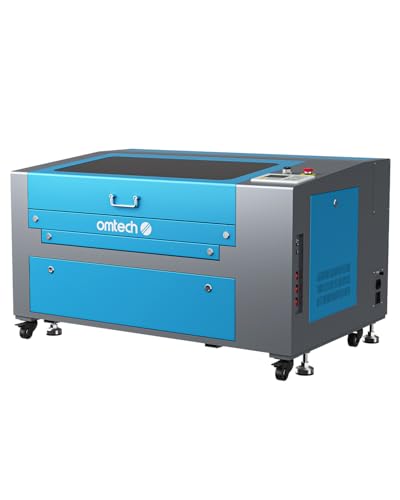
Best CO2 for wood: OMTech 60W CO2 Laser Engraver, 16 x 24 in, 2-Way Pass-Through, Air Assist
Best CO2 for wood
OMTech 60W CO2 Laser Engraver, 16 x 24 in, 2-Way Pass-Through, Air Assist
OMTech
- Optical wattage: 60 W (DC glass tube)
- Type: CO2, enclosed
- Work area: 16 × 24 in (400 × 600 mm)
- Max speed: Not listed
- Materials: Wood, glass, acrylic, leather and other non-metals (engraves to 0.4 in)
- Air assist: Built-in
OMTech's 16 x 24 in 60 W CO2 engraver with two-way pass-through doors, a cover interlock, built-in air assist and a digital control panel; it engraves wood, acrylic, leather and glass as deep as 10 mm.
Last checked 2026-10-09
Best compact for wood signs: SCULPFUN iCube Ultra Laser Engraver, 12000mW Compact Portable Diode Laser for Wood Signs

Best compact for wood signs
SCULPFUN iCube Ultra Laser Engraver, 12000mW Compact Portable Diode Laser for Wood Signs
SCULPFUN
- Optical wattage: 12 W (12000mW module)
- Type: Diode (cube form factor)
- Work area: Compact
- Max speed: Not listed
- Materials: Wood, bamboo, slate, leather
- Air assist: Available
The Sculpfun iCube Ultra is a compact 12W cube that handles wood plaques and signage on a small footprint and packs away easily. It is the best compact pick for crafters making wood signs in a tight workspace.
Last checked 2026-10-09
Who should buy what
The sign and gift maker who mostly engraves — entry-to-mid diode
If your wood work is mainly engraving — signs, plaques, cutting boards, ornaments — the best overall and best for engraving slots point the same way: a 10–20W optical diode on a mid-size frame with air assist. Spec-by-spec, that engraves any wood crisply and cuts thin ply for shapes, which covers the bulk of wood craft. The honest trade-off is thick cutting: it will not push through thick hardwood in one pass, so if cutting is occasional, run it in passes; if it is frequent, look higher up. This is the value path most wood makers should start on.
The maker on a tight budget — best budget wood engraver
The best budget wood engraver slot is for getting into wood work without overspending. Spec-by-spec, an entry diode (often 5–10W optical) engraves wood beautifully and cuts thin stock, which is enough for a first run of signs, tags and small gifts. The trade-off is headroom: thin-stock cutting only, and slower passes on anything thicker. Pair it with air assist and proper venting and it is a genuine starting machine — just buy it knowing its cutting ceiling so you are not surprised by it.
The maker who cuts thick hardwood — high-wattage diode or CO2
The best for cutting thick wood slot suits a maker who regularly cuts thick hardwood and wants clean edges in fewer passes. Spec-by-spec, a 40W diode pushes into thicker stock a 20W labours over, while a 40W+ CO2 cuts thick hardwood faster and with cleaner, lower-char edges — and opens up acrylic and other materials too. The trade-off is cost, heat and ventilation, and on the CO2 side a bigger machine to house. This is the band you move to when thick cutting, not engraving, is the job that defines your work.
The maker working big pieces — large-format
The best large-format slot is for the maker whose wood work is defined by size — large signs, panels, big batch sheets. The figure that matters here is work area rather than peak wattage: a frame of 400×400mm or larger does the big piece in one pass instead of tiling it in sections, which keeps alignment clean. Spec-by-spec, a large-format machine trades footprint and a bigger enclosure-and-venting job for capacity. Pick it against the largest single piece you actually make, and match the wattage separately to how thick you cut.
What to buy alongside the laser
A wood laser is the start of a small, natural cart. Check it can cut your thickness with the material-cut calculator, and weigh diode versus CO2 in the diode-vs-CO2 chooser. Then the best laser engraver accessories — air assist and fume extraction are the natural next buy for clean, low-char wood cuts.
Common wood-laser mistakes to avoid
The first mistake is buying cutting power you don't need — or not enough. Engraving wood needs very little optical wattage, while cutting scales hard with thickness, so a maker who only engraves overpays for a high-wattage machine, and one who needs to cut thick hardwood underbuys a small diode. Decide your engrave-versus-cut split first, then match the wattage to the thickest wood you actually cut.
The second is ignoring char and smoke. Wood cuts and engraves scorch without air assist, and wood cutting fills the room with harmful smoke without proper extraction. Run air assist for clean, low-char edges, mask the surface to reduce engrave scorching, keep the focus correct, and duct fume extraction outside. These are the difference between a clean sign and a smoky, marked one.
The third is treating wood as low-risk. Wood cutting is a genuine fire risk — never leave the laser running unattended, and keep the safety kit (correctly-rated glasses, extraction, a clear work area) in place every run. Get the wattage, the air assist and the fire watch right and wood becomes the most rewarding material a maker can run.
Frequently asked questions
What is the best laser engraver for wood?
For most makers, a 20W optical diode on a 400×400mm frame is the best all-round wood machine: it engraves any wood crisply and cuts plywood up to roughly 6mm in passes. If you need to cut thicker hardwood cleanly in one pass, step up to a 40W diode or a 40W+ CO2. Verified picks land on this page once real product data is in.
How much wattage do I need to cut wood?
Engraving wood needs very little power; cutting needs much more. A 5W optical diode mostly engraves and cuts only very thin wood, a 20W cuts ~6mm plywood in passes, and a 40W diode or 40W+ CO2 cuts thicker hardwood — CO2 with cleaner edges in fewer passes. Use the material-cut calculator to match wattage to thickness.
Diode or CO2 for wood?
Both work for wood, with a trade-off. A diode is cheaper and great for engraving and cutting thinner wood; a CO2 cuts thick wood faster and with cleaner, less-charred edges. If you mostly engrave and cut thin stock, a diode is the value pick; if you cut thick hardwood often, a CO2 earns its cost. The chooser walks the decision.
How do I get clean, low-char wood cuts?
Use air assist to clear smoke and suppress flame, keep the focus correct, and tune speed and passes for the wood and thickness. Masking the surface reduces edge scorching on engraves. Always run proper fume extraction ducted outside and never leave the laser unattended — wood cutting is a fire risk.