Laser Safety & Accessories
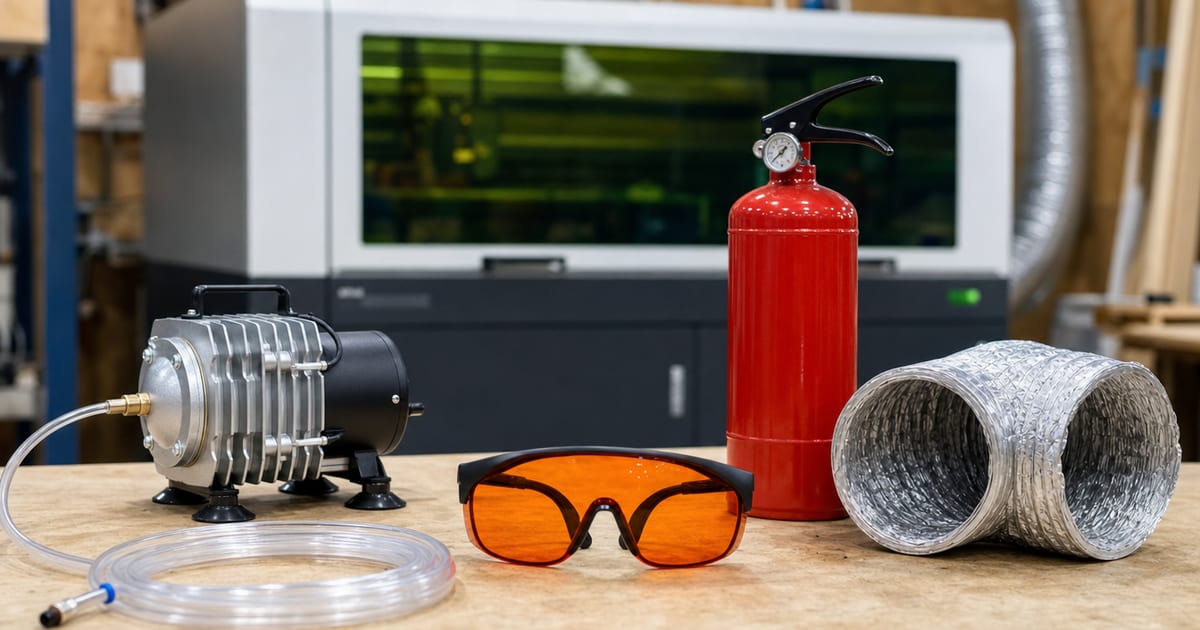
The machine is only the start of the setup. This silo covers the maker's kit beyond the laser — enclosures, air assist, exhaust and fume extraction, honeycomb beds, rotary attachments, correctly-rated laser glasses, and software like LightBurn — and sorts what is safety-critical from what is nice-to-have. Specs are verified against manufacturer and current Amazon listings; no hands-on testing is claimed.
The most expensive mistake in lasers isn't buying the wrong machine — it's buying the right machine and then trying to run it bare. A laser with no air assist scorches every cut; a laser with no ventilation fills the room with harmful smoke; a laser with no rated glasses puts your eyes at risk. So before the accessory shopping list, it helps to split the kit into two buckets: safety-critical (you don't run the machine without it) and nice-to-have (it makes the work better or easier). The split below is the order I'd buy in. If you're still at the choosing-a-machine stage, the maker's guide to choosing a first laser folds this whole cart into the buying decision.
Safety-critical: run nothing without these
- Correctly-rated laser glasses. They must match your machine's specific wavelength and optical density — diode and CO2 need different glasses, and a pair rated for one may give zero protection against the other. Ordinary tinted goggles do not protect your eyes.
- Fume extraction or ventilation ducted outside. Laser smoke from acrylic, leather and MDF is harmful to breathe at any scale, so an inline fan or extractor venting outdoors is non-negotiable. This is the piece makers most often underbuy.
- Air assist. A steady air stream across the cut blows smoke clear and suppresses flare-ups — cleaner edges and far less fire risk. On a cutting machine, treat it as essential.
Nice-to-have: better work, easier life
- Enclosure. Contains fumes, blocks stray laser light and cuts noise, which is what makes an open-frame machine usable in a garage or spare room — and what lets your extraction actually work. Strongly recommended even though it sits a notch below the must-haves.
- Honeycomb bed. Supports the work, lets the beam exit cleanly underneath and protects the surface below from cut-through. Cheap and worth fitting from day one.
- Rotary attachment. Only needed if you engrave tumblers, cups or bottles — but essential for that work. Confirm your machine supports one before buying.
What to buy first, and why air assist and fume kit lead
If the budget only stretches to a few accessories at launch, buy in safety order: rated glasses, then fume extraction, then air assist, then the enclosure, then the bed. The reasoning is simple — the first three protect your eyes, your lungs and your workshop from fire, and no amount of clever software makes up for skipping them. Air assist and the fume kit lead the hardware list because they affect every single cut. Air assist isn't just for clean edges; the air stream lifts smoke off the surface so the beam isn't fighting through its own haze, and it knocks down the small flames that flare up when you cut wood and acrylic. Fume extraction matters because the smoke those cuts produce is genuinely harmful to breathe, and an enclosure with an inline fan ducted outside is what makes a garage or spare-room setup safe to run for hours.
A honeycomb bed is cheap enough that there's no reason to skip it — it supports the work, lets the beam exit cleanly and saves the surface underneath — and a rotary attachment is a buy-when-you-need-it item for anyone engraving tumblers. The best laser engraver accessories guide breaks down specific options for each, and the material-cut calculator helps you confirm a machine can cut your material before you spend on the supporting kit at all.
Software: LightBurn vs bundled control
Most makers move off the software bundled with their machine and onto LightBurn, the maker-standard control software that works with the great majority of diode and CO2 lasers. It gives far better layout, control and material-setting tools than typical bundled apps, which is why it's the accessory people ask about most. The one caveat is compatibility: confirm your specific machine is LightBurn-supported before you rely on it. The best laser engraver accessories guide covers software alongside the hardware.
Featured guides
The current published guides in this silo. More land each batch.
Landing next: LightBurn software guide, laser engraver enclosure, best laser fume extractor, laser safety glasses guide, air assist explained, best rotary attachment, and laser honeycomb bed.
Kitting out a workshop properly is a habit that carries across hobbies. The makers who keep a well-organised miniature-painting bench think about ventilation, lighting and the right tools the same way we do here — the gear around the work matters as much as the work itself.
Frequently asked questions
What laser accessory is safety-critical, not optional?
Three things: correctly-rated laser glasses (matched to your machine’s wavelength and optical density), proper fume extraction or ventilation ducted outside, and air assist for clean cutting and flame suppression. Ordinary tinted goggles do not protect your eyes, and laser smoke is harmful to breathe — these are not nice-to-haves.
Do I need a fume extractor for a small laser?
Yes. Laser smoke from acrylic, leather and MDF is harmful to breathe regardless of machine size, so run proper fume extraction or an exhaust fan ducted outside. An enclosure plus an inline fan keeps a garage or spare room usable. Never cut materials that release toxic gas, such as PVC or vinyl.
Is LightBurn worth it over bundled software?
For most makers, yes — LightBurn is the maker-standard control software and works with most diode and CO2 lasers, with far better layout, control and material-setting tools than typical bundled software. Confirm your machine is LightBurn-compatible before relying on it.