Best Desktop CO2 Laser Cutters
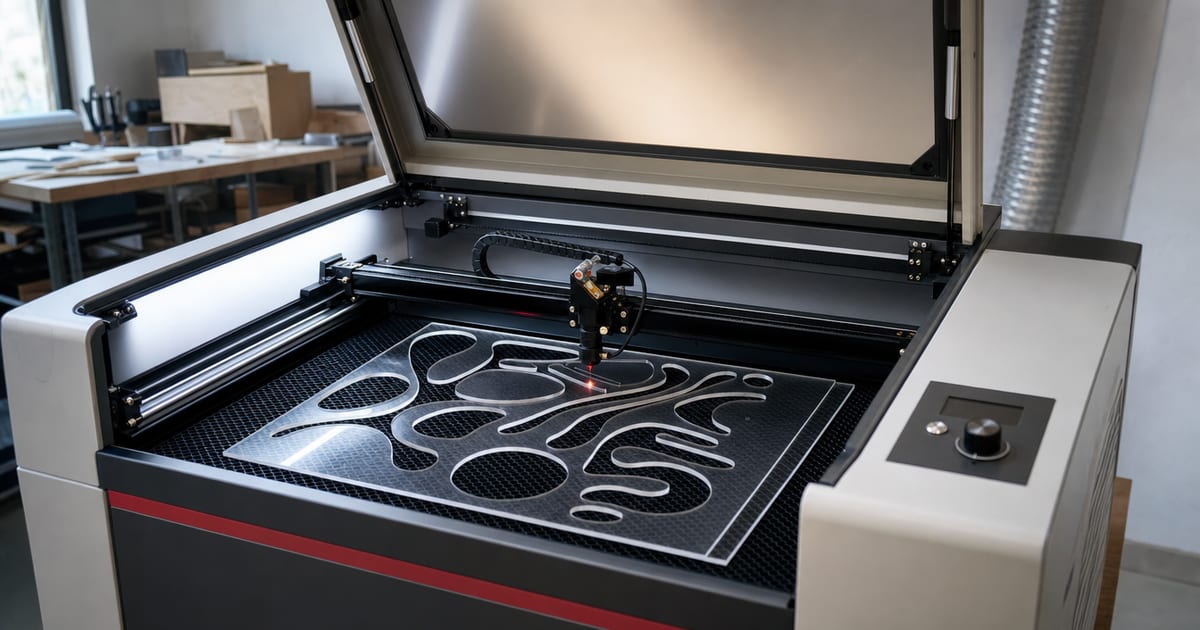
A desktop CO2 laser is the cutter — the machine that handles thick acrylic, wood and leather that a diode can't touch. The best one is the cutter with enough wattage and bed for your thickest, biggest job that you can actually vent in your space, not the most powerful tube you can buy. This guide explains the specs that decide the fit — optical wattage, enclosed-versus-open type, work area, cooling, materials and air assist — then matches them to five maker categories: best overall, best entry desktop CO2, best mid-power cutter, best high-power cutter and best enclosed/turnkey. Verified picks appear in each slot once real product data is in.
A note on how to read this. There is no single "best" CO2 cutter for everyone — the right one depends on the thickest material you cut, the size of the work, the cooling and venting your space allows, and your budget. So the value here is the framework: what each spec changes, so you can shortlist a cutter that fits your situation. Read the framework first, then look at the picks. The reason this site treats CO2 and diode as two different tools, not two price points of the same one, comes straight from my own first-laser mistake: I bought a cheap diode expecting it to cut clear acrylic, and it never could — a diode's ~450nm beam passes straight through clear acrylic, while a CO2's ~10.6µm beam is absorbed and cuts it cleanly. That is the whole reason a maker who works acrylic, glass or thick stock ends up here rather than on the diode page.
Specs verified against manufacturer details and current Amazon listings — no hands-on testing claims, just the figures and the trade-offs that decide the fit. Cut/engrave-capability figures are drawn from published specs and manufacturer cut charts, not bench tests.
How to choose a desktop CO2 laser cutter
A handful of specs decide whether a CO2 cutter suits you. These are exactly the columns in the comparison below, and matching them to your work is most of what stops you under- or over-buying.
Optical wattage — what it cuts and how cleanly
On a CO2 laser the optical wattage is more honest than on a diode — most desktop CO2 machines quote a real tube wattage — and it scales directly with cutting depth, speed and edge quality. Acrylic absorbs CO2's ~10.6µm light extremely well, so CO2 cuts it where a diode cannot. Spec-by-spec, a 40W desktop CO2 cuts roughly 6–10mm acrylic cleanly and flame-polishes the edge; 60W cuts thicker stock faster and in one pass where a 40W would need two; 80–100W pushes into thick acrylic, thick hardwood and dense stock with more headroom and speed.
The trade-off is that wattage drives cost, size, heat and cooling: a 100W glass-tube cutter is a bigger, water-cooled machine that needs more space and venting than a compact 40W. So the honest question is the thickest material you cut regularly, not the thickest you can imagine. A maker who mostly cuts 3–6mm acrylic and ply is well served by a 40–60W; one who routinely cuts 10mm+ stock earns the step up. The material-cut calculator turns a material and thickness into the wattage that does it.
Enclosed versus open-frame — the type that shapes your whole setup
Desktop CO2 cutters come enclosed (a sealed cabinet, often with a built-in exhaust port and lid interlock) or open-frame (an exposed gantry like a larger diode). The type changes far more than looks: an enclosed unit contains the beam, simplifies venting to a single duct, and is the safer, tidier choice for a home workshop. An open-frame CO2 is usually cheaper and more configurable but demands a careful enclosure and ventilation plan of your own, and leaves more room for error around the beam.
Spec-by-spec, an enclosed turnkey CO2 trades some price and bed flexibility for safety and a much simpler exhaust path, which is why it suits most home makers. An open-frame suits a maker who wants a bigger bed or DIY control and is prepared to build the safety setup around it. Either way, fume extraction ducted outside and correctly-rated handling are non-negotiable — the type only changes how you achieve them, not whether you need them.
Work area and cooling — bed size and tube protection
Work area on a CO2 is the maximum sheet it cuts in one pass, and desktop beds commonly run from roughly 300×200mm up to 700×500mm and beyond. Spec-by-spec, a 500×300mm bed handles most acrylic signage, boxes and batch craft; a smaller bed forces you to tile larger sheets. Cooling pairs with wattage: lower-wattage compact units are often effectively air-managed, while higher-wattage glass-tube CO2 lasers (frequently 60W+) are water-cooled to protect the tube and hold power across long cuts.
The trade-off is that water cooling adds a pump and reservoir to manage but is what makes higher wattage and long cutting runs viable. Match cooling to the wattage you actually need rather than treating it as an upsell — a water-cooled 80W left without proper cooling discipline shortens its own tube life. Pick the bed against the largest single sheet you realistically cut, and let that and your thickness set the wattage and cooling together.
Air assist, venting and safety — built into the buying decision
Air assist is essential on a CO2 cutter for clean edges and flame suppression, and venting is safety-critical, not optional: CO2 cutting of acrylic, wood and leather produces significant harmful smoke that must be extracted and ducted outside or filtered through a proper fume extractor. Never cut materials that release toxic gas, such as PVC or vinyl, and never leave a running laser unattended — cutting is a fire risk. The best laser engraver accessories guide covers the extraction and air-assist kit, and a CO2 buyer should budget for it as part of the machine, not an afterthought.
| Best for | Optical wattage | Type | Work area | Materials | Air assist |
|---|---|---|---|---|---|
| Best overall CO2 | 60 W (DC glass tube) | CO2, enclosed desktop | 20 × 28 in (500 × 700 mm) | Wood, acrylic, leather, glass and other non-metals (engraves to 0.4 in) | Built-in |
| Best budget CO2 | 45 W | CO2, enclosed desktop | 12 × 8 in | Acrylic to 0.4 in, wood to 0.31 in, other non-metals | Built-in 45°, auto-adjusting |
| Best high-power CO2 | 100 W | CO2, enclosed floor-standing | 20 × 28 in | Acrylic to 0.98 in, wood to 0.59 in, other non-metals | Built-in |
| Best all-in-one CO2 | 70 W | CO2, all-in-one desktop (built-in water cooling) | 28 × 14 in | Acrylic to 20 mm, basswood to 18 mm, other non-metals | Built-in air duct / smoke extraction |
| Best large-bed CO2 | 100 W | CO2, enclosed floor-standing | 24 × 35 in (600 × 900 mm) | Non-metals; cuts to 0.59 in in one pass | Built-in, 2-way pass-through |
Our top picks
Best overall CO2: OMTech 60W CO2 Laser Engraver, 28 x 20 in, Autolift, 4-Way Pass-Through, Air Assist
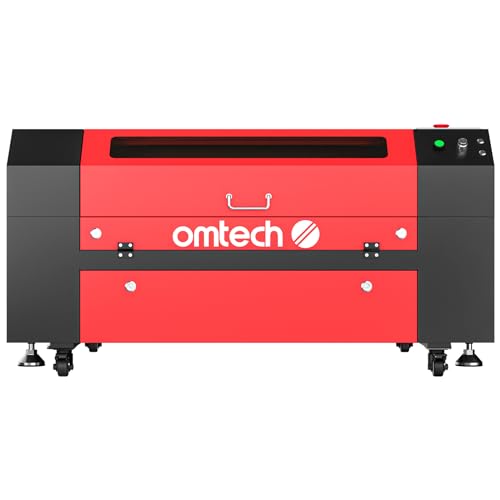
Best overall CO2
OMTech 60W CO2 Laser Engraver, 28 x 20 in, Autolift, 4-Way Pass-Through, Air Assist
OMTech
- Optical wattage: 60 W (DC glass tube)
- Type: CO2, enclosed desktop
- Work area: 20 × 28 in (500 × 700 mm)
- Max speed: 600 mm/s (23.6 ips)
- Materials: Wood, acrylic, leather, glass and other non-metals (engraves to 0.4 in)
- Air assist: Built-in
OMTech's 60 W DC-tube CO2 machine with a 20 x 28 in motorised (autolift) bed, four-way pass-through doors, built-in air assist and speeds up to 600 mm/s; engraves as deep as 10 mm on non-metals.
Last checked 2026-10-09
Best budget CO2: OMTech K40+ 45W Desktop CO2 Laser Engraver and Cutter

Best budget CO2
OMTech K40+ 45W Desktop CO2 Laser Engraver and Cutter
OMTech
- Optical wattage: 45 W
- Type: CO2, enclosed desktop
- Work area: 12 × 8 in
- Max speed: 300 mm/s (engraving)
- Materials: Acrylic to 0.4 in, wood to 0.31 in, other non-metals
- Air assist: Built-in 45°, auto-adjusting
The K40+ is OMTech's compact 45 W CO2 cutter with a 12 x 8 in bed, built-in auto-adjusting air assist and LightBurn/LaserGRBL support; OMTech rates it to cut 10 mm acrylic and 8 mm wood.
Last checked 2026-10-09
Best high-power CO2: OMTech 100W CO2 Laser Engraver, 20 x 28 in, 4-Way Pass-Through, Autofocus, Air Assist
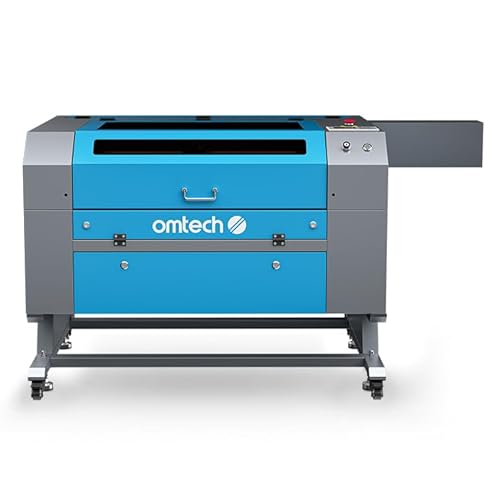
Best high-power CO2
OMTech 100W CO2 Laser Engraver, 20 x 28 in, 4-Way Pass-Through, Autofocus, Air Assist
OMTech
- Optical wattage: 100 W
- Type: CO2, enclosed floor-standing
- Work area: 20 × 28 in
- Max speed: 600 mm/s
- Materials: Acrylic to 0.98 in, wood to 0.59 in, other non-metals
- Air assist: Built-in
OMTech's 100 W CO2 cutter with a 20 x 28 in honeycomb bed, motorised autofocus workbed, four-way pass-through and built-in air assist; OMTech rates it to cut acrylic up to 0.98 in and wood up to 0.59 in at speeds to 600 mm/s.
Last checked 2026-10-09
Best all-in-one CO2: Monport MEGAS 70W Desktop CO2 Laser Engraver and Cutter, 28 x 14 in, Built-in Water Cooling, 8MP Camera, Autofocus

Best all-in-one CO2
Monport MEGAS 70W Desktop CO2 Laser Engraver and Cutter, 28 x 14 in, Built-in Water Cooling, 8MP Camera, Autofocus
Monport
- Optical wattage: 70 W
- Type: CO2, all-in-one desktop (built-in water cooling)
- Work area: 28 × 14 in
- Max speed: Not listed
- Materials: Acrylic to 20 mm, basswood to 18 mm, other non-metals
- Air assist: Built-in air duct / smoke extraction
Monport's MEGAS packs a 70 W CO2 tube, built-in water cooling, an 8 MP camera, thickness-sensor autofocus and an air-duct smoke system into one desktop unit; Monport rates it to cut 20 mm acrylic and 18 mm basswood.
Last checked 2026-10-09
Best large-bed CO2: VEVOR 100W CO2 Laser Engraver and Cutter, 24 x 35 in, 2-Way Pass-Through, Air Assist

Best large-bed CO2
VEVOR 100W CO2 Laser Engraver and Cutter, 24 x 35 in, 2-Way Pass-Through, Air Assist
VEVOR
- Optical wattage: 100 W
- Type: CO2, enclosed floor-standing
- Work area: 24 × 35 in (600 × 900 mm)
- Max speed: 19.7 ips
- Materials: Non-metals; cuts to 0.59 in in one pass
- Air assist: Built-in, 2-way pass-through
VEVOR's 100 W CO2 machine offers a 24 x 35 in (600 x 900 mm) working area, 19.7 ips travel, a red-dot pointer, two-way pass-through and air assist, and works with LightBurn, CorelDRAW and AutoCAD; VEVOR rates it to cut up to 0.59 in in one pass.
Last checked 2026-10-09
Who should buy what
The maker stepping up from a diode — entry desktop CO2
If you already engrave on a diode and keep hitting its wall on clear acrylic and thick stock, the best overall and best entry desktop CO2 slots point the same way: a 40–60W enclosed desktop CO2 with a mid-size bed. Spec-by-spec, that band cuts acrylic, thicker wood and leather cleanly in one or two passes and engraves glass and slate — the exact capabilities a diode can't reach. The honest trade-off is footprint and venting: even an entry CO2 is a bigger machine that needs a real exhaust path, so plan the duct before the purchase.
The all-round acrylic and sign maker — mid-power cutter
The best mid-power cutter slot is the popular sweet spot for makers whose work is mostly 3–10mm acrylic, ply and hardwood. Spec-by-spec, a 60W-class enclosed CO2 cuts that range cleanly and fast, flame-polishes acrylic edges, and has the bed for signage and boxes. On a vented enclosure with air assist it is the machine most acrylic-and-sign sellers settle on. The trade-off is that very thick stock (10mm+ acrylic or dense hardwood) still wants more wattage and slower passes — that is the line into the high-power band.
The maker who cuts thick and fast — high-power cutter
The best high-power cutter slot suits a maker cutting thick stock regularly or running production volume. Spec-by-spec, an 80–100W glass-tube CO2 delivers the headroom to cut thick acrylic and hardwood in one pass and to keep speed up over long runs, where it is usually water-cooled to hold power and protect the tube. The trade-off is real: it is a larger, water-cooled, more demanding machine on space, power and venting. This is the band you buy for genuine thick-cutting volume, not for occasional thick jobs a mid-power unit can handle in extra passes.
The buyer who wants it simple — enclosed/turnkey
The best enclosed/turnkey slot is for the maker who values a tidy, safer, ready-to-run setup over maximum configurability. The figures that matter here are the sealed cabinet, the built-in exhaust port and the lid interlock rather than peak wattage: an enclosed turnkey CO2 contains the beam, simplifies venting to a single duct, and is the most home-friendly way into CO2 cutting. The trade-off is some bed flexibility and a higher price than a bare open-frame — usually worth it for a home workshop where a clean exhaust path and a contained beam matter most.
What to buy alongside the laser
A CO2 cutter is the start of a small, natural cart. Check it can cut your material with the material-cut calculator, and if you're weighing it against a diode, the diode-vs-CO2 chooser helps. Then see the best laser engraver for wood for your material, and the best laser engraver accessories — fume extraction is the non-negotiable next buy.
Common CO2-buying mistakes to avoid
The first mistake is buying more wattage than your space and work need. A 100W water-cooled cutter is a large machine with a real cooling and venting burden; if you mostly cut 3–6mm acrylic and ply, a 40–60W does the job in a smaller, simpler footprint. Match the wattage to the thickest material you cut regularly, not the thickest you can picture.
The second is under-planning the exhaust. A CO2 cutter produces significant smoke from acrylic, wood and leather, and that has to be extracted and ducted outside or filtered properly. Plan the duct route and the airflow rating before you buy the machine, not after — an enclosed turnkey unit simplifies this to a single port, while an open-frame leaves the whole job to you.
The third is cutting the wrong materials. Never cut PVC or vinyl: they release toxic gas that harms you and corrodes the machine. And never leave a running cutter unattended — CO2 cutting is a genuine fire risk. Wear correctly-rated laser glasses, run the extraction, and treat the safety kit as part of the purchase. Get the wattage, venting and material rules right and a CO2 cutter is the most capable tool in a maker's workshop.
Frequently asked questions
What is the best desktop CO2 laser cutter?
For most makers, a 40–60W enclosed desktop CO2 with a 500×300mm bed is the best all-round cutter: enough power to cut acrylic, thick wood and leather cleanly in one pass, engrave glass and slate, and an enclosure that simplifies venting. The right pick depends on the thickest material you cut. Verified picks land on this page once real product data is in.
How much wattage does a CO2 laser need to cut acrylic?
CO2 cuts acrylic far more easily than a diode because acrylic absorbs ~10.6µm light well. A 40W desktop CO2 cuts roughly 6–10mm acrylic cleanly; 60–100W cuts thicker stock in one pass and faster. Higher wattage also means cleaner, flame-polished edges. Use the material-cut calculator for a per-thickness check.
Air-cooled or water-cooled CO2 laser?
Most lower-wattage compact desktop CO2 units are effectively air-managed, while higher-wattage glass-tube CO2 lasers (often 60W+) are water-cooled to protect the tube and hold power. Water cooling adds a pump and reservoir but supports the wattage needed for thick cutting. Match cooling to the wattage you need.
Does a CO2 laser still need fume extraction?
Absolutely — CO2 cutting produces significant smoke from acrylic, wood and leather, all harmful to breathe. Run proper fume extraction or an exhaust fan ducted outside, wear correctly-rated laser glasses, and never cut materials that release toxic gas such as PVC or vinyl. Never leave the laser running unattended.