Best Diode Laser Engravers
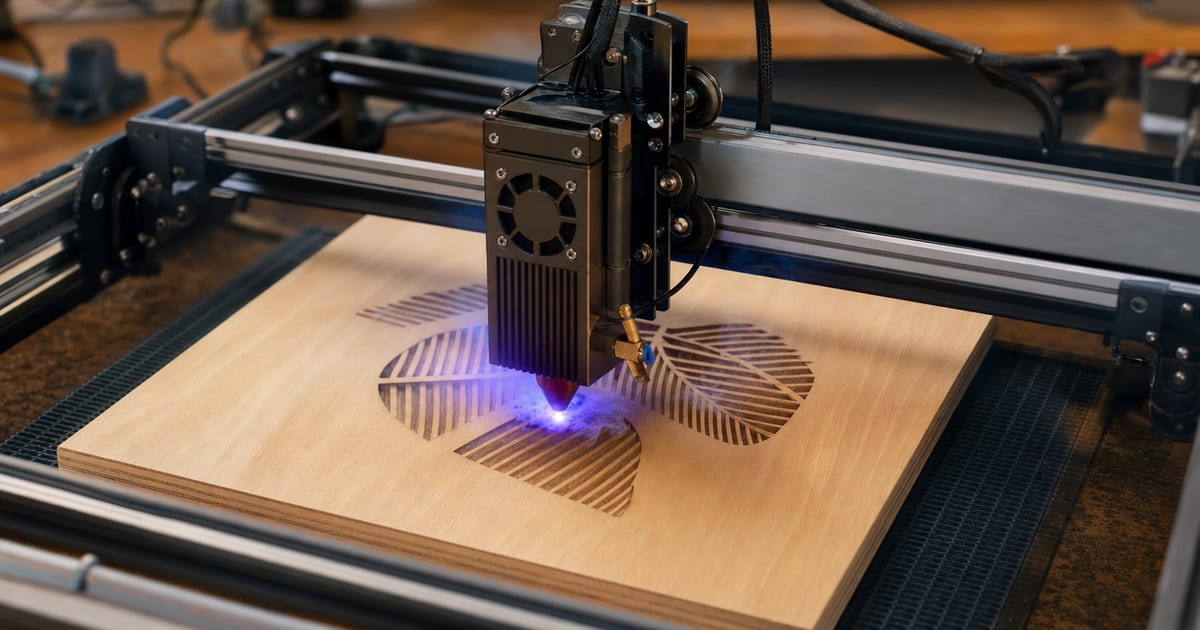
The best diode laser is the one with enough optical wattage to cut what you want, on a bed big enough for your work — without falling for the inflated box-watt number. For most makers that means a mid-wattage open-frame diode in the 10–20W optical band, matched to the thickest material on your list, not the biggest number on the box. This guide explains the specs that decide the fit — optical wattage, diode versus the box-watt trap, work area, engrave-versus-cut capability, speed and air assist — then matches them to five maker categories: best overall, best budget diode, best mid-wattage all-rounder, best high-wattage cutter and best portable/compact. Verified picks appear in each slot once real product data is in.
A note on how to read this. There is no single "best" diode laser for everyone — the right one depends on the thickest material you want to cut, the size of work you make, the ventilation you can set up, and your budget. So the value here is the framework: what each spec changes, so you can shortlist a machine that fits your situation. Read the framework first, then look at the picks. In my own workshop the lesson that shaped this whole site was the opposite of that approach — my first laser was a cheap diode bought on a huge "input watt" number on the box, and when I set out to cut 6mm clear acrylic for a craft order it could barely scorch it, never mind cut it. That weekend is why this guide leads with optical wattage and the diode-versus-CO2 material divide instead of the headline watt figure: those are the numbers that separate a machine you keep from one you replace.
Specs verified against manufacturer details and current Amazon listings — no hands-on testing claims, just the figures and the trade-offs that decide the fit. Cut/engrave-capability figures are drawn from published specs and manufacturer cut charts, not bench tests.
How to choose a diode laser engraver
A handful of specs decide whether a diode suits you. These are exactly the columns in the comparison below, and getting them right is most of what stops you buying a machine you outgrow in a season.
Optical wattage — the number that matters most (and the one the box lies about)
Optical wattage is the actual laser power that reaches the material, measured in watts, and it is what decides whether a diode engraves a material or can cut through it. The catch is that most listings shout an "input" or "electrical" wattage instead — a far bigger number describing how much power the unit draws, not how much light hits the work. A diode sold as "80W" or "130W" is almost always a 10W or 20W optical machine. Spec-by-spec, the only figure that predicts cutting is the optical watt rating, so find it before anything else and ignore the headline number.
The bands break down roughly like this. A 5W optical diode mostly engraves and cuts only very thin wood and card. A 10W cuts thin plywood and dark acrylic in passes and engraves cleanly. A 20W is the all-round maker band — it cuts plywood up to roughly 6mm in passes, engraves wood, leather and coated metal, and handles dark acrylic. A 40W diode pushes into thicker hardwood. The trap is assuming more optical watts is always better: a 40W diode costs more, runs hotter and still cannot cut clear acrylic, so the honest question is not "how many watts can I afford" but "how many watts does my thickest material actually need". Run the material-cut calculator to turn a material and thickness into the optical wattage that does the job.
What a diode can and can't cut — the material divide
A diode laser emits at around 450nm — blue light — and that wavelength sets a hard limit on what it can work, no matter the wattage. It is absorbed well by wood, leather, MDF, card, slate and dark or opaque acrylic, so a diode engraves and (with enough optical watts) cuts those. But ~450nm light passes straight through clear acrylic and reflects off bare shiny metal, so a diode cannot cut or cleanly engrave clear acrylic and cannot cut metal at all — it can only mark coated or treated metal surfaces. Spec-by-spec, a 20W optical diode cuts ~6mm basswood in passes but will not cut clear acrylic of any thickness, because the material lets the beam through instead of absorbing it.
This is the single most expensive thing makers get wrong, and it is the mistake the whole site is built around. If clear acrylic, glass-through-cut or metal cutting is on your list, no diode is the answer — you need a CO2 laser for clear acrylic and thick stock. The diode-vs-CO2 chooser walks the decision from the materials you actually want to make.
Work area — how big a bed you actually need
Work area is the maximum size the machine can engrave or cut in one pass, and it sets the ceiling on your projects more often than wattage does. Common open-frame diodes run from compact 100×100mm portable beds up to 400×400mm and beyond. Spec-by-spec, a 400×400mm frame covers most signs, cutting boards and batch craft runs, while a 100×100mm portable suits keychains, tags and small gifts but forces you to tile larger pieces in sections.
The trade-off is footprint and price against capacity: a larger frame needs more bench space and a bigger enclosure to vent, but a bed that is too small caps the work you can sell. Pick the bed against the largest single piece you realistically want to make, not the average one — it is cheaper to buy the right size once than to upgrade the whole machine for one oversized job.
Speed, air assist and the rest of the fit
Two more specs round out the decision. Engraving speed (often quoted in mm/min) affects throughput on big batch runs, but for most makers cut quality and wattage matter more than the headline speed figure — a faster machine that scorches is not faster in practice. Air assist, by contrast, is not optional for cutting and clean engraving: it blows smoke and flame off the cut for cleaner edges, far less scorching and fewer flare-ups. Treat a built-in or add-on air assist as a requirement, not a bonus, and pair it with proper fume extraction ducted outside. The best laser engraver accessories guide covers the air-assist and extraction kit in detail.
| Best for | Optical wattage | Type | Work area | Materials | Air assist |
|---|---|---|---|---|---|
| Best overall diode | 10 W (module) | Diode (blue 455nm) | Approx 400 x 415 mm | Wood, leather, acrylic, coated/anodized metal | Included |
| Best budget diode | 7 W (7000mW module) | Diode | 200 x 150 mm | Wood, acrylic, leather, some metals | Not listed |
| Best high-power diode | 48 W (marketed module power) | Diode (multi-beam) | Large-format | Thick wood, acrylic, metal marking | Included |
| Best portable diode | 12 W (12000mW module) | Diode (cube form factor) | Compact | Wood, leather, acrylic, slate | Available |
| Best enclosed diode | Compact diode module | Diode (fully enclosed) | 12 x 12 in | Wood, paper, leather, acrylic | Built-in filtration/exhaust |
Our top picks
Best overall diode: CREALITY FALCON 10W Laser Engraver with Air Assist, Diode Laser Cutter for Wood Metal Acrylic

Best overall diode
CREALITY FALCON 10W Laser Engraver with Air Assist, Diode Laser Cutter for Wood Metal Acrylic
Creality
- Optical wattage: 10 W (module)
- Type: Diode (blue 455nm)
- Work area: Approx 400 x 415 mm
- Max speed: Up to ~25,000 mm/min
- Materials: Wood, leather, acrylic, coated/anodized metal
- Air assist: Included
The Creality Falcon 10W is a balanced, popular diode engraver with air assist and broad software support. It is the best all-round pick for hobbyists who want reliable engraving and light cutting across common materials.
Last checked 2026-06-15
Best budget diode: Artilume U1 Laser Engraver & Cutter Machine with 200x150mm Area, LightBurn Compatible, 7000mW

Best budget diode
Artilume U1 Laser Engraver & Cutter Machine with 200x150mm Area, LightBurn Compatible, 7000mW
Artilume
- Optical wattage: 7 W (7000mW module)
- Type: Diode
- Work area: 200 x 150 mm
- Max speed: Not listed
- Materials: Wood, acrylic, leather, some metals
- Air assist: Not listed
The Artilume U1 is a compact, LightBurn-compatible engraver at the lowest price in this lineup. It suits beginners and small-business crafters wanting an affordable entry into laser engraving.
Last checked 2026-06-15
Best high-power diode: ATOMSTACK A40 Pro V2 48W Laser Engraver with R8 Rotary, High-Power Diode Laser Cutter

Best high-power diode
ATOMSTACK A40 Pro V2 48W Laser Engraver with R8 Rotary, High-Power Diode Laser Cutter
ATOMSTACK
- Optical wattage: 48 W (marketed module power)
- Type: Diode (multi-beam)
- Work area: Large-format
- Max speed: High-speed
- Materials: Thick wood, acrylic, metal marking
- Air assist: Included
The ATOMSTACK A40 Pro V2 uses a high-power multi-beam diode module to cut thicker wood and acrylic than typical hobby units, and ships with a rotary. It is the best high-power diode pick for makers who need real cutting capacity.
Last checked 2026-06-15
Best portable diode: SCULPFUN iCube Ultra Laser Engraver, 12000mW Compact Portable Diode Laser

Best portable diode
SCULPFUN iCube Ultra Laser Engraver, 12000mW Compact Portable Diode Laser
SCULPFUN
- Optical wattage: 12 W (12000mW module)
- Type: Diode (cube form factor)
- Work area: Compact
- Max speed: Not listed
- Materials: Wood, leather, acrylic, slate
- Air assist: Available
The Sculpfun iCube Ultra packs a 12W module into a small all-in-one cube that's easy to move and store. It is the best portable pick for crafters with limited bench space or who need to pack the machine away.
Last checked 2026-06-15
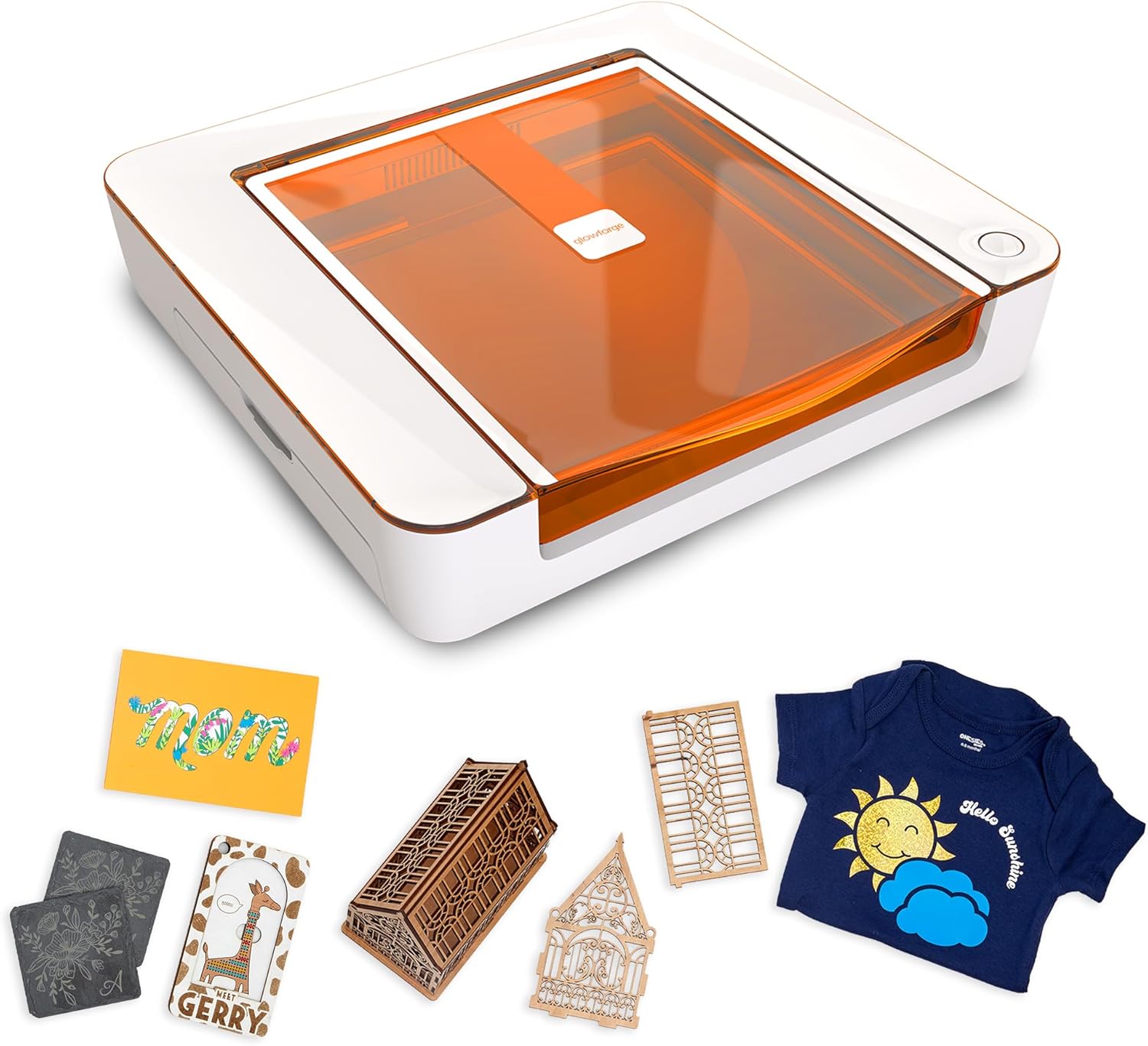
Best enclosed diode: Glowforge Aura Laser Engraver and Cutter, Enclosed Desktop Craft Laser
Best enclosed diode
Glowforge Aura Laser Engraver and Cutter, Enclosed Desktop Craft Laser
Glowforge
- Optical wattage: Compact diode module
- Type: Diode (fully enclosed)
- Work area: 12 x 12 in
- Max speed: Not listed
- Materials: Wood, paper, leather, acrylic
- Air assist: Built-in filtration/exhaust
The Glowforge Aura is a fully enclosed desktop craft laser with a built-in camera and simple cloud software for safe, classroom- and home-friendly use. It is the best enclosed pick for users who want a contained machine without building their own enclosure.
Last checked 2026-06-15
Who should buy what
The first-time maker — entry wattage, deliberate workflow
If this is your first laser, the best overall and best budget diode slots point the same way: a 10–20W optical open-frame diode with air assist on a mid-size bed. Spec-by-spec, that band engraves any wood, leather and slate crisply and cuts thin plywood and dark acrylic in passes — which covers the signs, ornaments and tags most new makers start with. The honest trade-off is that it will not cut thick hardwood in one pass or touch clear acrylic, so be clear about your material list before you buy. The mistake to avoid is the one I made: chasing the headline box-watt number into a machine that could not cut what I bought it for.
The all-round craft seller — mid-wattage, mid-size bed
The best mid-wattage all-rounder slot is the popular sweet spot. Spec-by-spec, a 20W optical diode on a 400×400mm frame is the band that does the widest range of maker work without overbuying: it cuts ~6mm plywood and dark acrylic in passes, engraves a full material set, and has a bed large enough for batch runs and bigger signs. On a vented enclosure with air assist it is the machine most craft sellers settle on and rarely feel the need to leave. The trade-off is that thick hardwood cutting still wants more — either a 40W diode or a CO2.
The maker who cuts thick and often — high-wattage diode
The best high-wattage cutter slot suits a maker who cuts thicker hardwood regularly and wants fewer passes. Spec-by-spec, a 40W optical diode pushes into thicker stock a 20W labours over, which on the right frame means cleaner, faster cuts on the wood it suits. The trade-off is real: a high-wattage diode costs more, runs hotter, demands serious ventilation, and still cannot cut clear acrylic or metal — for those you cross to a CO2 cutter. This is the band you grow into for thick wood, not a fix for the diode material limits.
The buyer who needs portability — compact frame
The best portable/compact slot is for the maker who needs to pack the machine away or take it to markets and makerspaces. The figure that matters here is footprint and frame design rather than peak wattage: a compact 100–200mm bed and a foldable or lightweight frame trade capacity for portability. Spec-by-spec, a portable diode still engraves the full material set and cuts thin stock, but tiles larger pieces in sections. The trade-off is bed size — match it to the smallest, most repeatable work you make rather than your biggest one-off project.
What to buy alongside the laser
A diode is the start of a small, natural cart. Check it can cut your material with the material-cut calculator, and if you're still choosing a type, the diode-vs-CO2 chooser helps. Then sort the best laser engraver for wood for your material, and the best laser engraver accessories — air assist and fume extraction are the natural next buy.
Common diode-buying mistakes to avoid
The most common and costly mistake is buying on the inflated box-watt number. A diode listed as "80W" or "130W" is describing input or electrical draw, not laser power — the optical wattage is usually 10W or 20W, and that smaller figure is the only one that predicts cutting. Decide on optical watts and ignore the headline, every time.
The second mistake is expecting a diode to do CO2 work. No diode cuts clear acrylic or metal, whatever its wattage, because ~450nm light passes through clear acrylic and reflects off bare metal. If those materials are on your list, you are shopping for a CO2 cutter, not a bigger diode — confirm the divide in the diode-vs-CO2 chooser before you spend.
The third is skimping on air assist and ventilation. A diode cut without air assist scorches and flares; a diode run without proper fume extraction fills the room with harmful smoke. Treat both as part of the machine's cost, not an optional extra, and never run the laser unattended. Get those three right and an entry diode becomes a machine you keep, instead of one you fight and replace.
Frequently asked questions
What is the best diode laser engraver?
For most makers, a 20W optical diode on a 400×400mm frame is the best all-round pick: enough power to cut plywood and dark acrylic in passes, engrave wood, leather and coated metal, and a bed large enough for signs and batch runs. The right pick depends on the thickest material you want to cut. Verified picks land on this page once real product data is in.
How much optical wattage do I need in a diode?
Match it to what you cut. A 5W optical diode mostly engraves and cuts only very thin wood; a 10W cuts thin wood and dark acrylic; a 20W cuts plywood up to roughly 6mm in passes; a 40W cuts thicker hardwood. Always compare optical watts, not the inflated input/electrical wattage on the box.
Can a diode laser cut acrylic?
Only dark or opaque acrylic — and only in passes as wattage allows. A diode laser at ~450nm passes straight through clear acrylic, so it cannot cut or cleanly engrave it. For clear acrylic, you need a CO2 laser. The material-cut calculator flags this for any material and thickness.
Do diode lasers need air assist?
For cutting and clean engraving, yes — treat it as essential. Air assist blows smoke and flame off the cut, giving cleaner edges and far less scorching, and it suppresses flare-ups. Combine it with proper fume extraction ducted outside, and never leave the laser running unattended.